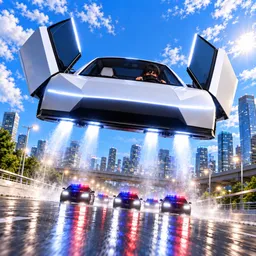
How to start: 5 quick steps
- Do the first quest: drive 200 m with W to go and A and D to steer.
- Learn Boost (Shift) and Fly (Space); the speedometer is at the bottom right.
- Watch the wanted stars and timer at the top left once the police are on you.
- Use the highway, back roads and shortcuts on the map to lose the police.
- Open the shop to spend cash on paint, jets, trails and crates.
On this page · 9 sections
Tap a step to tick it off. Your ticks stay in this browser.
Your progress 0 / 5
Step 1 · 0:43
Learn to drive
On screen: Drive 200 m
- Several white wedge-shaped Roadsters are parked in a lot; the quest bar reads 43/200.
- The hint says to use W to go and A and D to steer.
Step 2 · 2:11
Boost and Fly
On screen: Get away
- Three jet streams fire from under the Roadster as it crosses a hill.
- The Boost and Fly buttons and a x1.4 multiplier are on screen.
Step 3 · 11:01
Spend cash in the shop
On screen: Shop
- Tabs read Paint, Rims, Doors, Tint, Glow, Jets, Trail, Cabin, Crates and Robux.
- The Street crate costs 10,000 cash and the Pro crate 25,000, each with drop rates printed.
Step 4 · 12:29
Fly over the highway
On screen: Escape the police
- A teal car with jets firing flies above a highway at 229 MPH, with a loop ramp ahead and a x2.0 multiplier.
Step 5 · 16:54
Five wanted stars
On screen: Survive the chase
- Five stars fill at the top left while two white police cars wait further down the road.
- The earnings counter keeps running during the chase.
What the screen shows
| Where | What it shows |
|---|---|
| Top | A quest bar such as Drive 200 m, with progress like 43/200 |
| Left edge | Three buttons: Shop, Quests and Settings |
| Top left (chase) | Five wanted stars, a timer and a green cash figure that climbs while the chase continues |
| Top right | A minimap with a gold marker for you and red dots for pursuers, plus a red POLICE button |
| Bottom right | Boost (Shift) and Fly (Space) buttons and a round MPH speedometer (126 MPH on a highway, 229 MPH flying) |
| Above the car | A multiplier tag such as x1.4 or x2.0; the game doesn't show what drives it |
Keys seen on screen
| Key | Does |
|---|---|
| W / A / D | Go and steer, per the opening hint |
| Shift | Boost |
| Space | Fly |
Upgrade menu
The upgrade menu as shown in the TonyCool guide video (Nov 3, 2026).
| Item | What it shows |
|---|---|
| Tabs | Upgrades, Engine, Wing, Paint, Rims, Doors, Tint, Glow, Jets, Trail, Cabin |
| Jets | “Longer BOOST and FLY, quicker recharge”: BOOST 3.4s to 3.7s and FLY 4.5s to 5.0s for 3,000 cash (first level) |
Beginner tips
- The game's description lists a highway, back roads and shortcuts on the map, so use all three to lose the police.
- The Jets tab on the upgrade menu is described as longer BOOST and FLY with quicker recharge; the first level was priced at 3,000 cash in one video.
- Crates show their drop rates before you buy, so read them first.
- Codes from “Drive A Flying Tesla Roadster!” are for a different game.
Watch it
The steps above come from one video: “We played TESLA ROADSTER POLICE CHASE In Roblox...” by Andy Plays (uploaded Nov 3, 2026). Each “Watch” button jumps to that moment.
FAQ
What are the controls in Tesla Roadster Chase?
W to go and A and D to steer, Shift for Boost and Space for Fly, per the on-screen hints and buttons.
How do I escape the police?
In the footage the car boosts and flies over hills and highways while the wanted stars fill. The game's description says the map has a highway, back roads and shortcuts to escape across.
What can I buy with cash?
Per the game's description you earn cash to upgrade the Roadster's speed and style. The shop has Paint, Rims, Doors, Tint, Glow, Jets, Trail, Cabin and Crates tabs.
Does it have codes?
None confirmed. See the codes page for what we checked.
How many players can join?
The Roblox page lists up to 16 per server.
Sources
- Roblox game page for Tesla Roadster Chase: description (checked Nov 15, 2026)
- Player video “We played TESLA ROADSTER POLICE CHASE In Roblox...” by Andy Plays (Nov 3, 2026)
- Player video “Tesla Roadster Chase GUIDE!” by TonyCool (Nov 3, 2026)