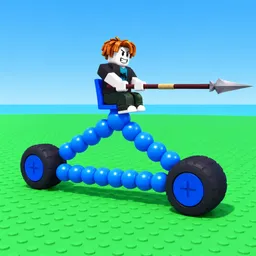
How to start: 6 quick steps
- Open the drawing screen and connect a rider, two wheels and a weapon using the ink you have.
- Use the DUEL, SKINS, UPGRADES and SHOP buttons before you fight if you want a different build or more ink.
- Press FIGHT and swipe to drive the cart toward the enemy.
- Hit the enemy rider with your weapon to knock them off their cart.
- Push the enemy into the water or make them hit the ground to finish the round.
- Spend the coins from a win on ink upgrades, and come back at ten wins for QUESTS, career stats and the boss fight.
On this page · 10 sections
Tap a step to tick it off. Your ticks stay in this browser.
Your progress 0 / 4
Step 1 · 0:10
Draw your cart on the grid
On screen: Draw your cart with limited ink to join your rider, wheels and weapon
- The drawing screen is a blue grid. A blue ink bar sits on the left and an INK counter underneath it.
- Player footage shows a long sword drawn above two round wheels; the button row reads DUEL, SKINS, UPGRADES and SHOP.
Step 2 · 0:35
Press FIGHT and win the round
On screen: VICTORY! +50 COINS, STREAK 1
- The result screen in the guide video reads VICTORY with 50 coins and a streak of 1.
- A '2X EVERY WIN' prompt appears with a price and a NEXT button to continue.
Step 3 · 0:88
Knock the rider off
On screen: OUCH! — Training Bot 3
- The guide shows a blue cart and a red cart meeting in an arena with trees and a Japanese-style gate.
- The opponent is labelled Training Bot 3 and the on-screen reaction reads OUCH after a hit.
Step 4 · 0:90
Open SKINS for hats, balls, wheels and flags
On screen: HATS · BALLS · WHEELS · FLAGS
- The skins panel has four tabs and shows an EQUIPPED item plus other cards with prices such as 2500.
- Another frame shows a cart with a CRITICAL hit label during a fight, so weapons and skins are separate parts of the build.
The bars on your screen
| Bar | What it means |
|---|---|
| Ink meter | Vertical blue bar on the left of the drawing screen, with an INK droplet counter beneath it (player footage) |
| Bottom buttons | DUEL, SKINS, UPGRADES and SHOP on the drawing screen (player footage) |
| Fight buttons | BOOST and FIGHT appear next to the ink meter in another frame (player footage) |
| Victory screen | 'VICTORY! +50 COINS, STREAK 1' and a '2X EVERY WIN' prompt with a NEXT button (player footage) |
| Skins tabs | HATS, BALLS, WHEELS and FLAGS, with an EQUIPPED item and prices such as 2500 shown on cards (player footage) |
| Enemy label | Training Bot 1 and Training Bot 3 appear above the opponent in early fights (player footage) |
| Server size | 6 players (Roblox API) |
Controls (PC)
| Key | Does |
|---|---|
| Draw | Place rider, wheels and weapon on the grid with limited ink |
| FIGHT | Start the round and drive at the enemy cart |
| Swipe | Drive the cart toward the enemy (official description) |
| Weapon | Hit the enemy rider to knock them off |
| DUEL | Challenge a player in your server |
| BOOST | Button visible beside the ink meter in player footage |
| SKINS / UPGRADES / SHOP | Cosmetics, ink upgrades and the shop |
What the game promises
Taken from the Roblox description; we did not see every feature in the footage.
| Feature | What the description says |
|---|---|
| Drawing | Draw a cart with limited ink, joining rider, wheels and weapon |
| Fighting | Press FIGHT and swipe to drive at the enemy cart |
| Winning | Hit the rider, push the enemy into water or into the ground, break their cart and smash through walls |
| Boss | Every tenth win is a giant boss fight |
| Rewards | Coins for ink upgrades; hats, balls, wheels and flags in SKINS |
| Later | QUESTS and career stats unlock at 10 wins |
| Platforms | Desktop, console, mobile and tablet |
Survival tips
- Ink is limited, so connect the rider, wheels and weapon before spending ink on decoration.
- The official description says you can win by knocking the rider off, pushing the enemy into water, or making them hit the ground.
- Coins pay for ink upgrades; winning more rounds is the way to get a bigger ink budget.
- DUEL challenges another player in your server, while early rounds in the videos are against Training Bots.
- Save progress for ten wins: the description says QUESTS, career stats and a giant boss fight start there.
Game passes
Prices from the game's Roblox store page. None are needed to finish the tutorial.
| Pass | Price |
|---|---|
| 2x Coins | 99 Robux |
| Double Ink | 199 Robux |
Watch it
Every step above comes from one 2-minute playthrough: “How to Play Draw Your Cart Roblox Full Guide” by VendoPlus. Each “Watch” button jumps straight to that step.
FAQ
How do you draw a cart in Draw Your Cart?
On the blue grid screen, place a rider, two wheels and a weapon while staying inside your limited ink budget, then press FIGHT to drive the cart.
How do you win a fight?
The Roblox description says to hit the enemy rider with your weapon, push them into the water or make them hit the ground. Breaking pieces off their cart and smashing through walls also helps.
What do coins do?
The description says to spend coins in UPGRADES for more INK. Roblox lists two game passes, 2x Coins and Double Ink, which we did not buy.
When is the boss fight?
The official description says every tenth win is a giant boss fight.
Sources
- Roblox game page and games API (universe 10775599302), read Nov 27, 2026
- VendoPlus, 'How to Play Draw Your Cart Roblox Full Guide' (YouTube, Nov 27, 2026)
- TonyCool, 'Draw Your Cart GUIDE! (Best Cart Designs, How To Win, Tips & Tricks)' (YouTube, Nov 27, 2026)
- Bloxophobia, 'Draw Your Cart! Roblox Walkthrough' (YouTube, Nov 27, 2026)