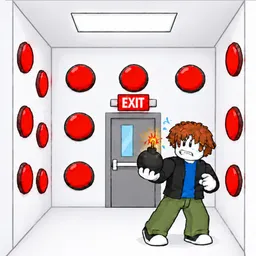
How to start: 6 quick steps
- Wait for the banner to say YOUR TURN.
- Click a button in your box before the timer runs out.
- Watch what pops up: items, FROZEN and other effects.
- Pick Explosion, Slime or Freeze when SEND AN ATTACK! appears.
- Keep an eye on both HP bars and use HEAL.
- Look for the EXIT door.
On this page · 8 sections
Tap a step to tick it off. Your ticks stay in this browser.
Your progress 0 / 6
Step 1 · 1:19
Start your turn
On screen: YOUR TURN — click a button! (11)
- A green banner at the top says it is your turn and counts down (11 here). When it is the other player's turn it turns grey and shows their name and turn timer.
- Your box is covered in red buttons. A flame counter floats above your character (1 here).
Step 2 · 3:08
Read what a button does
On screen: WATERMELON!
- After a click, a red message names what you hit (WATERMELON! here). Some buttons in the box show pictures of items such as a watermelon, a bone and a toilet.
- The flame counter above your head had gone up to 4 by this point.
Step 3 · 4:03
Beware of freezes
On screen: FROZEN! (Next turn is skipped)
- A freeze effect puts you in a block of ice and your next turn is skipped.
- Your HP in this frame is 32 against the opponent's 80.
Step 4 · 5:52
Send an attack
On screen: SEND AN ATTACK! Pick one!
- A purple window offers three attacks with a countdown (9 here): Explosion (Explosion in their box), Slime (Slime them) and Freeze (They skip a turn).
- Press SEND under the one you want. The window shows the opponent's box and HP behind it.
Step 5 · 6:46
Find the EXIT
On screen: EXIT!!!
- One button in the box opens a door marked EXIT!!! and your character can run through it.
- Both HP bars read 34 here and the cash counter reads $600.
Step 6 · 9:30
Watch the other player's turn
On screen: The other player's turn… (12)
- While the other player has the turn you only watch: a message such as KETCHUP & MUSTARD! shows what they did.
- HP is 29 for you and 11 for the opponent in this frame, and the HEAL button is still under your character.
What is on your screen
| Where | What it shows |
|---|---|
| Top | Cash counter ($100 at 1:19, $725 at 9:30) and a trophy counter (1 at 1:19, 7 at 9:30) |
| Banner | Whose turn it is and a countdown in seconds |
| Bottom | Two HP bars: You, and your opponent (100 and 80 at the start of this match) |
| Under your character | A HEAL button with a small counter |
| Left edge | Three buttons: a NUKE button, REVEAL and HINT (the labels are partly cut off in the video) |
| Right edge | A red Forfeit button |
| Players | Up to 24 per server; a match is you and one other player |
Buttons you can press
| Key | Does |
|---|---|
| Click or tap a button in the box | Take your turn |
| SEND under Explosion, Slime or Freeze | Attack the other player |
| HEAL | Heal yourself |
| Forfeit | Give up the match |
| Arrow at the bottom right | Jump (mobile) |
Beginner tips
- Don't let the turn timer run out: the banner counts down from about 11.
- A FROZEN effect skips your next turn, so Freeze is a way to make the other player lose one.
- Keep an eye on the cash counter: it went up over the match in the video.
- Look for the EXIT door: it is the point of the game according to the description.
Watch it
The steps come from Bear Game Blox's 10-minute video. Each “Watch” button jumps to that moment. We only describe what is on screen; we haven't tested the game ourselves.
FAQ
How do you play Button Battles?
You and another player are put in two boxes and press buttons until you find the exit. Some buttons are traps.
What attacks are there?
In the video the SEND AN ATTACK window offers Explosion, Slime and Freeze.
What does Freeze do?
The card says They skip a turn. On screen the frozen player sees FROZEN! (Next turn is skipped).
Can you heal?
Yes, a HEAL button sits under your character.
How many players can join a server?
Up to 24.
Sources
- Bear Game Blox, “Bear Plays Button Battles on Roblox” (YouTube): turn banner, button effects, attack window, EXIT door and HP bars.
- Roblox game page: description, player count and server size.