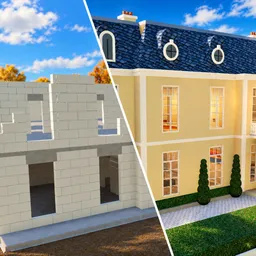
How to start: 6 quick steps
- Dig the pit inside the white lines with the shovel.
- Lay gravel and rebar, then pour the plinth with the concrete hose.
- Stack the block walls until the wall counter is full.
- Build the roof frame and lay the roof tiles.
- Fit windows and doors, then put up the ceiling.
- Plaster and paint, refilling paint at the pile when it runs out.
On this page · 8 sections
Tap a step to tick it off. Your ticks stay in this browser.
Your progress 0 / 8
Step 1 · 0:20
Dig the pit
On screen: Pit · Shovel Mastery
- Dig inside the white boundary line with the shovel. A Pit percentage and a Shovel Mastery bar show at the top left.
- The objective counter starts at 0/22 for this house.
Step 2 · 1:00
Lay gravel and rebar
On screen: Rebar 7/33
- The pit gets a gravel base, then rebar. The counter shows how many pieces are left.
Step 3 · 1:20
Pour the plinth
On screen: HOLD CLICK: POUR THE PLINTH!
- Use the concrete hose and hold click over the wooden frame.
- A Concrete Hose Mastery bar shows at the top left.
Step 4 · 1:50
Stack the walls
On screen: Walls 40/240
- Blocks come from a pallet. The label BCA FULL (10) shows how many you carry.
- The walls counter goes up to 240.
Step 5 · 3:10
Build the roof frame
On screen: BUILD THE ROOF FRAME!
- After the last wall the prompt changes and scaffolding rails appear around the top.
Step 6 · 3:35
Lay the roof tiles
On screen: Roof tiles 103/317
- Tiles are placed one by one over the battens. This house needs 317 of them.
Step 7 · 4:10
Put up the ceiling
On screen: PUT UP THE CEILING!
- Windows & doors show 6/8 in this frame, so they come first. Then the prompt asks for the ceiling.
Step 8 · 4:45
Plaster and paint
On screen: OUT OF PAINT! CLICK THE PILE TO REFILL
- The objective counter reads 14/22 here. A paint roller uses a refillable load such as Paint 35/40.
- Click the paint pile to refill, then keep painting.
What is on your screen
| Where | What it shows |
|---|---|
| Top left | An objective counter such as 14/22 with the current task and a mastery bar for the tool you hold |
| Bottom left | The load you carry, for example Gravel 40/40 or Paint 35/40, and your cash |
| Bottom right | A timer that keeps running, for example 00:06:40, and a notebook icon marked Tab |
| Left edge | A Bricky Helper icon and a capacity icon |
Controls
| Key | Does |
|---|---|
| Click / hold | Use the tool |
| F | Inspect the tool |
| Tab | Open the notebook to upgrade tools |
| E | Leave a handprint in wet concrete |
Beginner tips
- Read the middle-of-screen prompt before every step. It names the next job.
- The timer runs the whole build. The description says the fastest builders reach the leaderboard.
- Tools level up through Tool Mastery: Bronze, Silver, Gold, Diamond and Rainbow.
- Classes are spun for gems in the lobby. The footage shows Apprentice at 49.4% down to Tycoon at 0.1%.
- Digging can turn up treasures such as an Old Coin worth +1 gem.
Watch it
The steps above come from one 6-minute beginner video: “BEGINNER GUIDE …” by Radex Tips (uploaded Nov 13, 2026). Each Watch button jumps to that moment. Classes and the shop come from NoobBlox's video (Nov 11, 2026). The videos don't explain how cash or gems are earned, so we don't either.
FAQ
What do you do in Build a REAL House?
Per the game's description, you build a house from the ground up, alone or with friends: dig the pit, pour the concrete, stack the walls, put on the roof, plaster, paint and finish with tiles.
How many houses are there?
Seven: House, Pool, Villa, Mansion, Riviera Villa, and the new Sunset and Estate.
Are there codes?
We found none. See our codes page for where we looked.
How many players can join a server?
Up to 30.
Sources
- Roblox game page for Build a REAL House: description (checked Nov 15, 2026)
- Player video by Radex Tips (Nov 13, 2026): build order, counters and prompts
- Player video by NoobBlox (Nov 11, 2026): classes, shop and map screens
- Player video by Mali (Nov 11, 2026): pool house and mastery bars